Rain, Hail or Shine: Unveiling Mysteries of the Sky

Exploratory Data Analysis

Author

Roger Chen

Published

March 24, 2024

Modified

March 31, 2024

1 Issues to address

The group’s exploratory data analysis seeks to address the following:

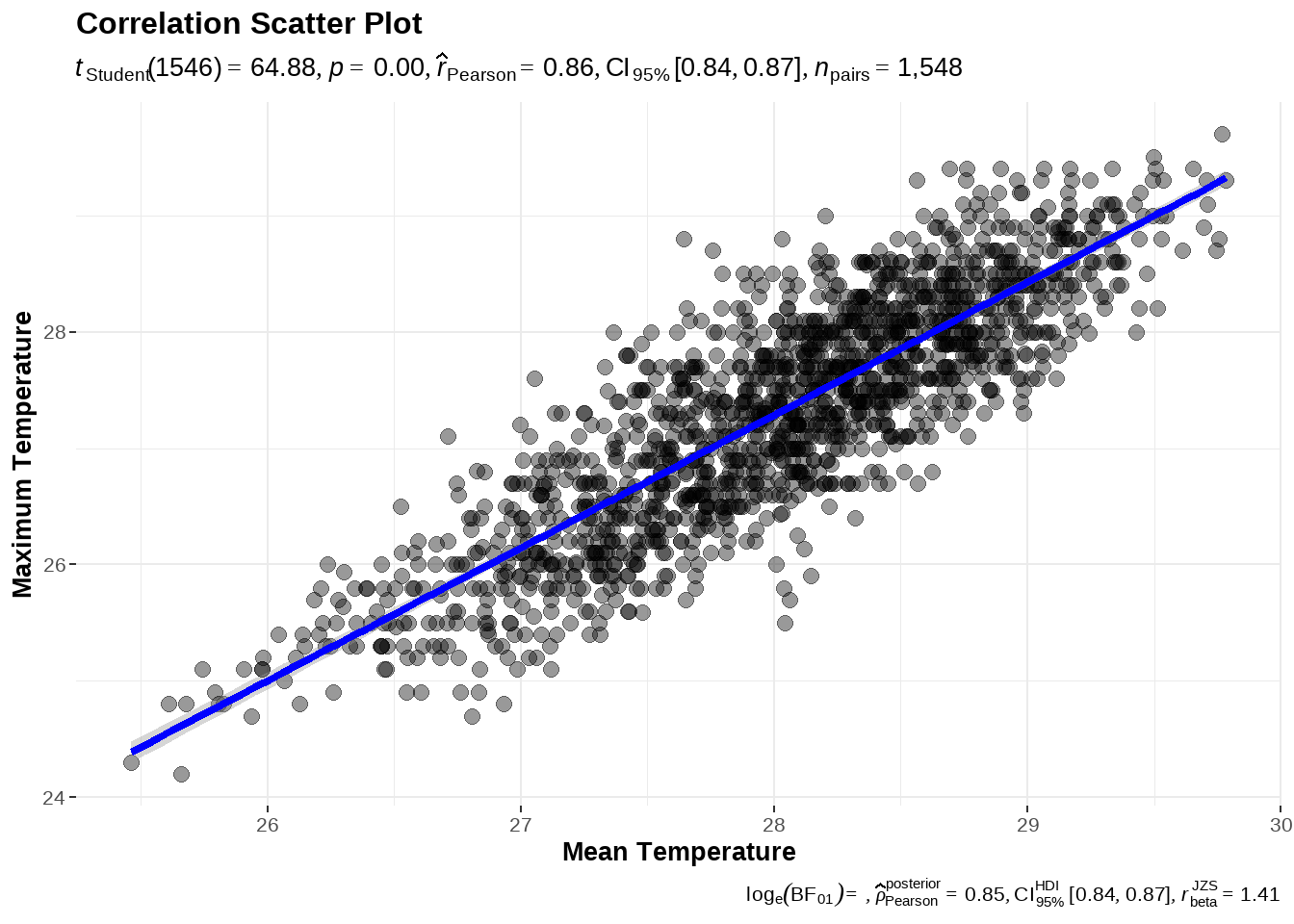
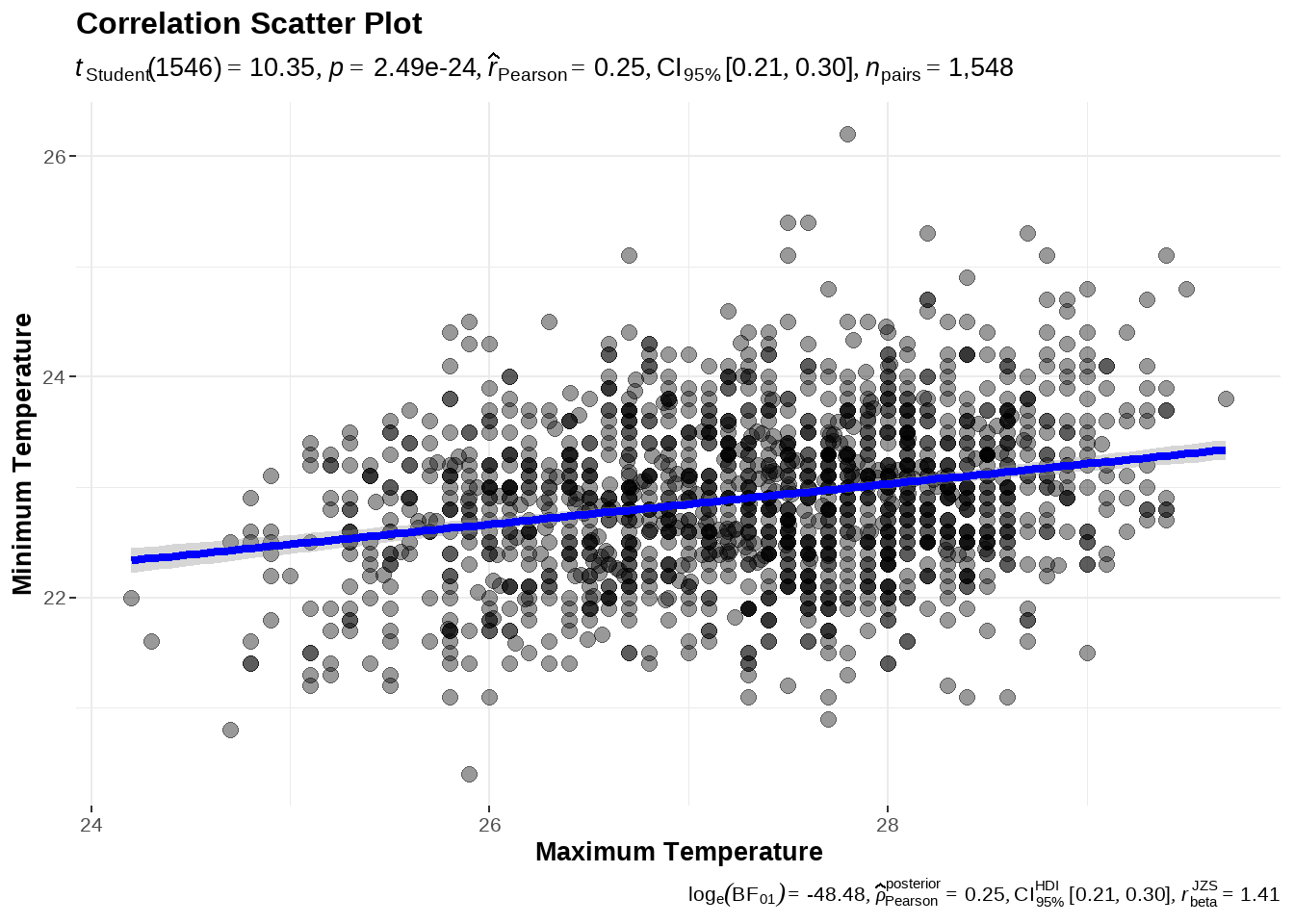
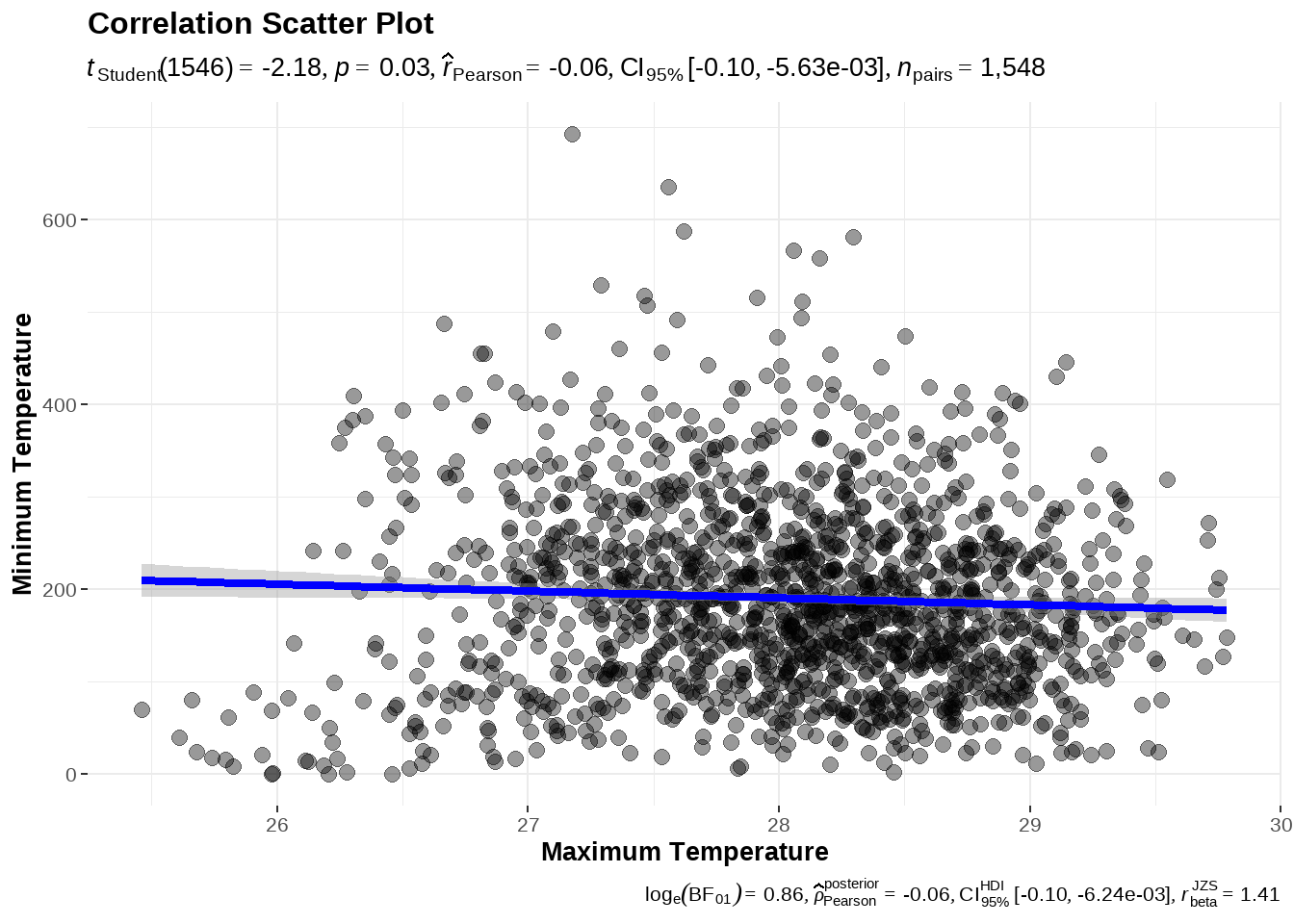
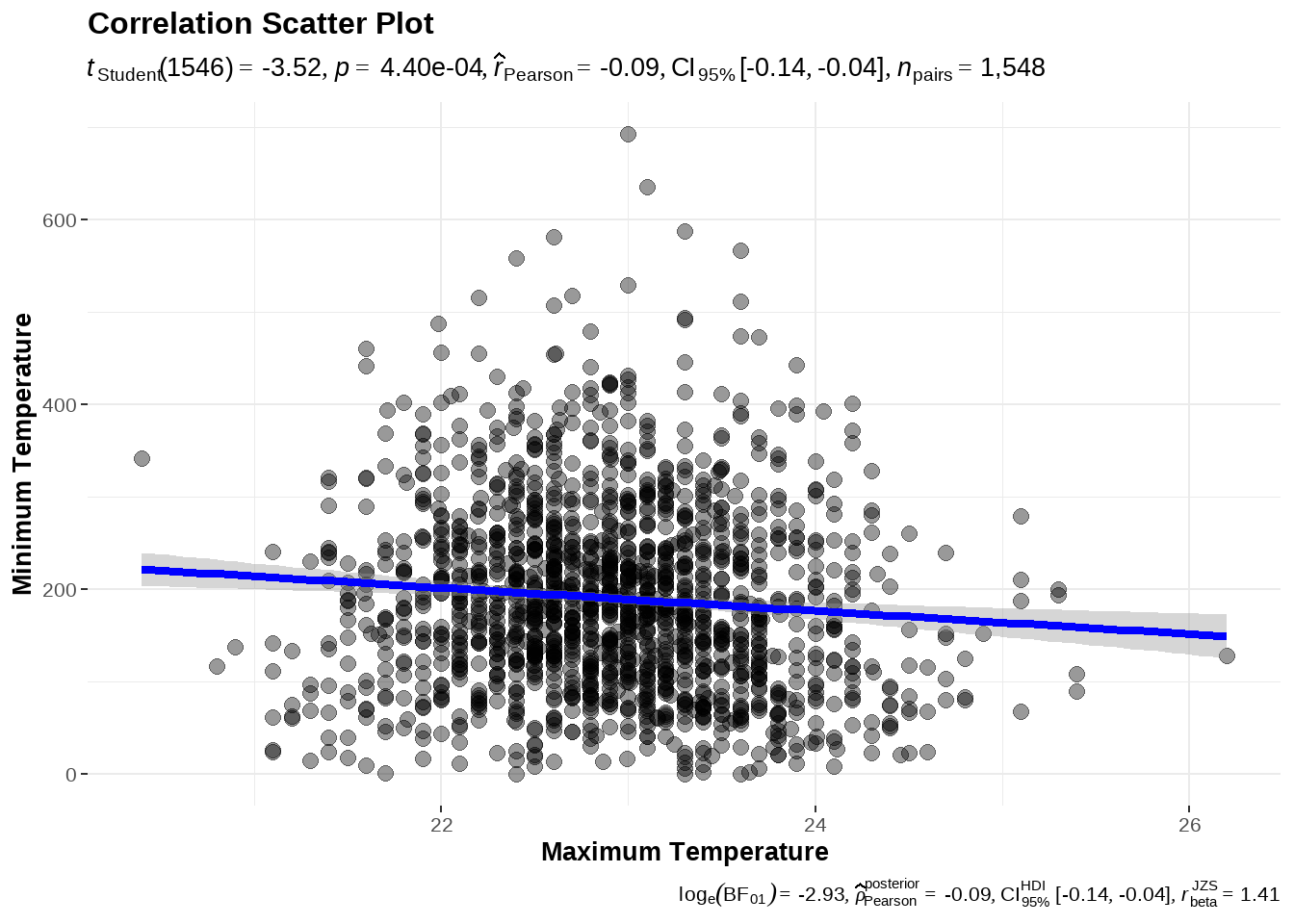
  • examine possible correlations between mean, minimum and maximum temperatures and rainfall

  • data visualisations of temperature by years, months and stations,

  • data visualisations of rainfall by years, months and stations.

2 Installing and loading the required libraries

The following code chunk is used to install the necessary R packages:

Code
pacman::p_load(tidyverse, shiny, bslib,lubridate, DT, ggplot2, plotly, ggthemes,
               hrbrthemes, timetk, modeltime, tidymodels,xgboost, recipes, parsnip,
               workflows, patchwork, thematic, showtext, glue, bsicons,tmap, sf,
               terra, gstat, automap, ggstatsplot, ggridges, ggrepel, ggsignif,
               gifski,gganimate, ggiraph, magick, car)
package 'rlang' successfully unpacked and MD5 sums checked
package 'tidyr' successfully unpacked and MD5 sums checked
package 'tidymodels' successfully unpacked and MD5 sums checked

The downloaded binary packages are in
    C:\Users\roger\AppData\Local\Temp\RtmpucYiBT\downloaded_packages

3 Importing the Dataset

Code
data <- read_rds("data/weather_data_imputed.rds")

glimpse(data)
Rows: 1,548
Columns: 6
Groups: station [13]
$ station                  <chr> "Admiralty", "Admiralty", "Admiralty", "Admir…
$ tdate                    <date> 2014-01-01, 2014-02-01, 2014-03-01, 2014-04-…
$ mean_monthly_temperature <dbl> 26.22903, 25.79355, 26.76071, 27.35484, 27.81…
$ min_monthly_temperature  <dbl> 21.70000, 22.40000, 21.80000, 23.50000, 22.40…
$ max_monthly_temperature  <dbl> 25.30000, 24.90000, 24.90000, 25.80000, 26.50…
$ monthly_rainfall         <dbl> 98.8000, 15.8000, 120.0000, 261.4000, 301.000…
Code
DT::datatable(data, class = "display compact", style = "bootstrap5")

3.1 Adding year and month columns - for ease of analysis

For ease of analysis for EDA, the DATE in data was further broken down into year and month and added as columns:

Code
data <- data %>%
  mutate(Year = year(tdate), Month = month(tdate))

glimpse(data)
Rows: 1,548
Columns: 8
Groups: station [13]
$ station                  <chr> "Admiralty", "Admiralty", "Admiralty", "Admir…
$ tdate                    <date> 2014-01-01, 2014-02-01, 2014-03-01, 2014-04-…
$ mean_monthly_temperature <dbl> 26.22903, 25.79355, 26.76071, 27.35484, 27.81…
$ min_monthly_temperature  <dbl> 21.70000, 22.40000, 21.80000, 23.50000, 22.40…
$ max_monthly_temperature  <dbl> 25.30000, 24.90000, 24.90000, 25.80000, 26.50…
$ monthly_rainfall         <dbl> 98.8000, 15.8000, 120.0000, 261.4000, 301.000…
$ Year                     <dbl> 2014, 2014, 2014, 2014, 2014, 2014, 2014, 201…
$ Month                    <dbl> 1, 2, 3, 4, 5, 6, 7, 8, 9, 11, 12, 1, 2, 3, 4…
4 Exploratory Data Analysis (EDA)

4.1 Correlation Analysis

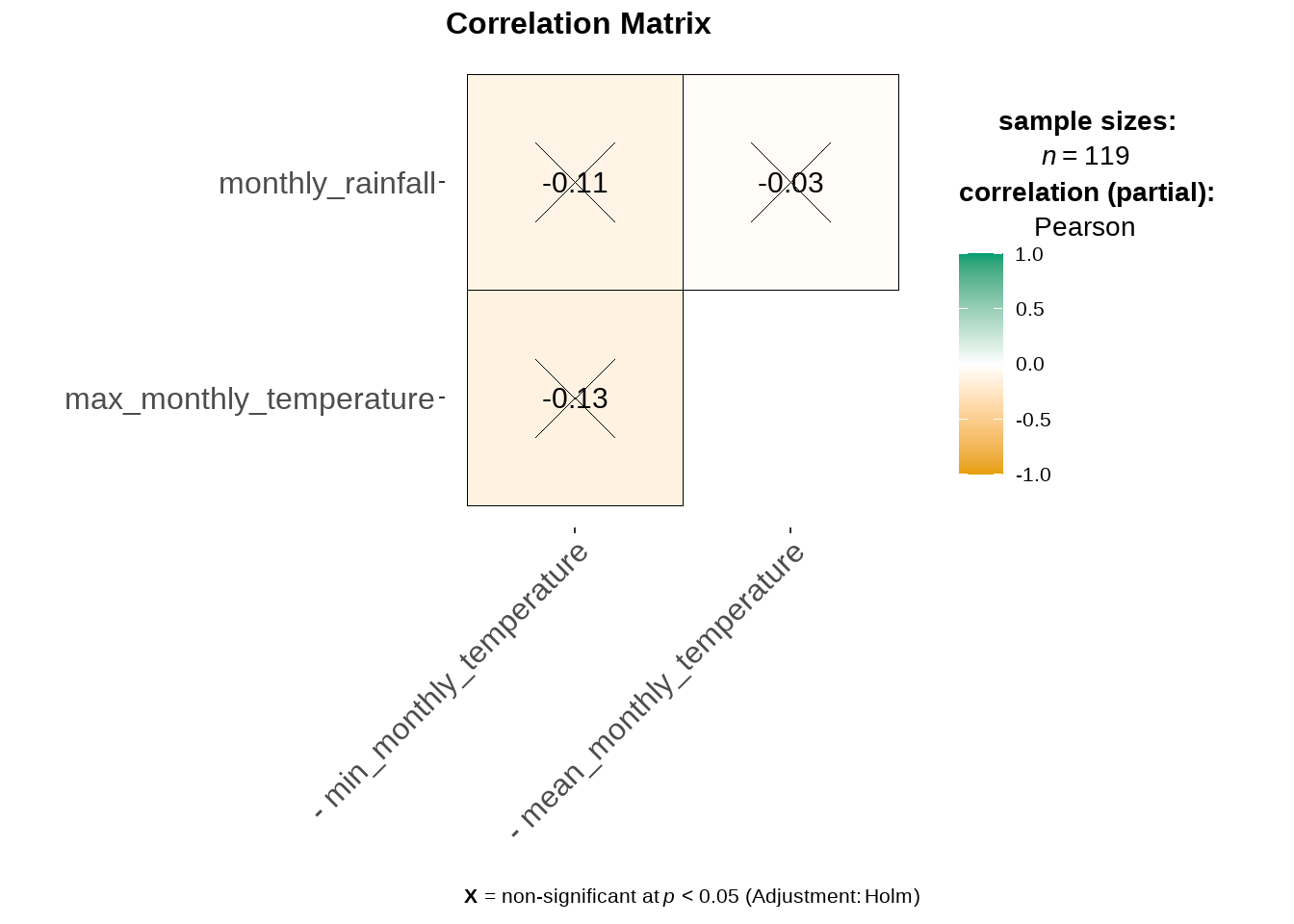
In each of the tabsets below, we will examine the correlation between the weather variables (i.e., mean temperature, minimum temperature, maximum temperature and rainfall.

Code
ggcorrmat(
  data,
  cor.vars = c(min_monthly_temperature, mean_monthly_temperature, max_monthly_temperature, monthly_rainfall),
  cor.vars.names = NULL,
  matrix.type = "upper",
  type = "parametric",
  tr = 0.1,
  partial = TRUE,
  digits = 2L,
  sig.level = 0.05,
  conf.level = 0.95,
  bf.prior = 0.707,
  p.adjust.method = "holm",
  pch = "cross",
  ggcorrplot.args = list(method = "square", outline.color = "black", pch.cex = 14),
  package = "RColorBrewer",
  palette = "Dark2",
  colors = c("#E69F00", "white", "#009E73"),
  ggtheme = ggstatsplot::theme_ggstatsplot(),
  ggplot.component = NULL,
  title = "Correlation Matrix" ,
  subtitle = NULL,
  caption = NULL
  )

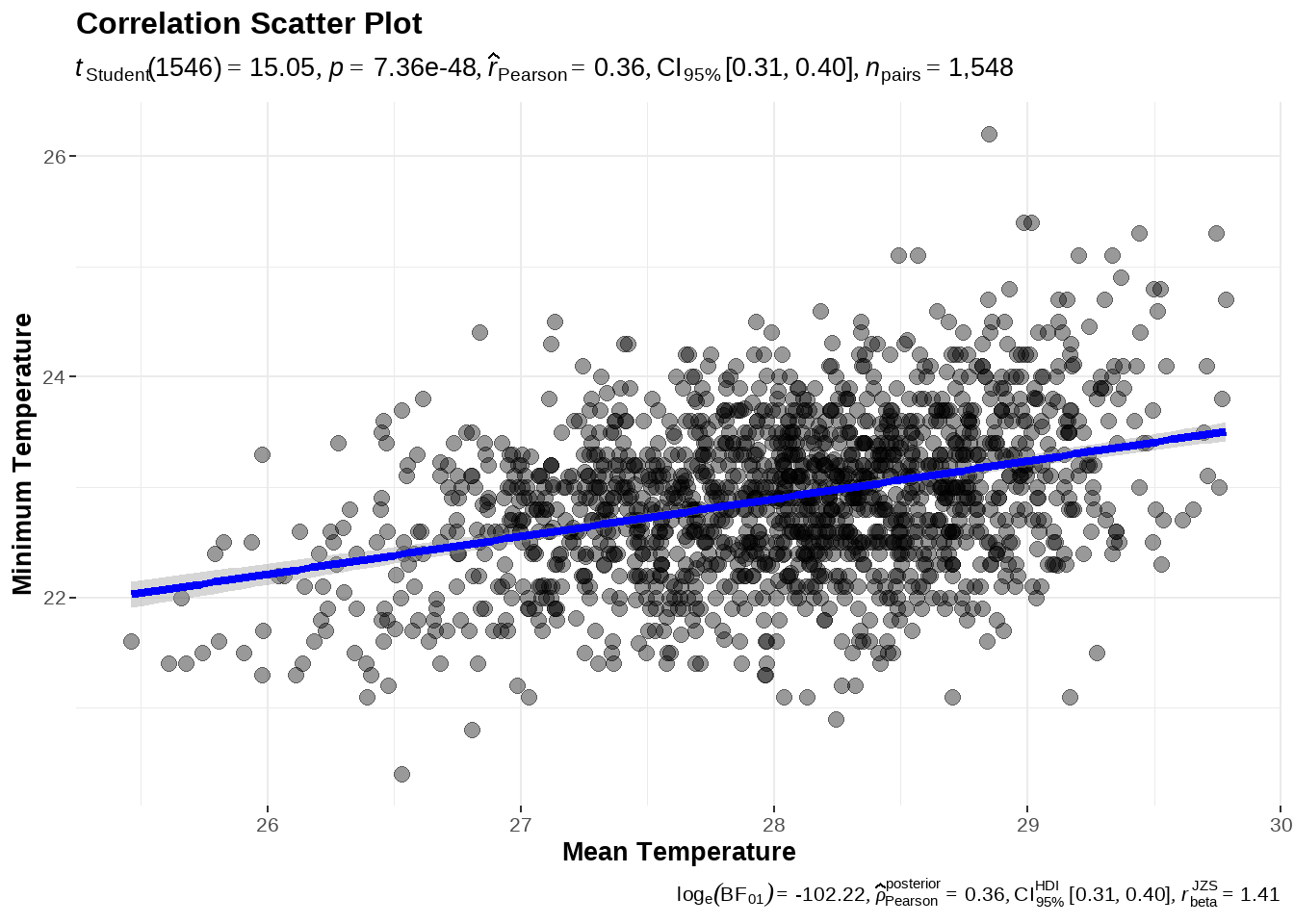
Code
ggscatterstats(
      data = data,
      x = mean_monthly_temperature,
      y = min_monthly_temperature,
      xlab = "Mean Temperature",
      ylab = "Minimum Temperature",
      title = "Correlation Scatter Plot",
      marginal = FALSE
    )

Code
ggscatterstats(
      data = data,
      x = mean_monthly_temperature,
      y = max_monthly_temperature,
      xlab = "Mean Temperature",
      ylab = "Maximum Temperature",
      title = "Correlation Scatter Plot",
      marginal = FALSE
    )

Code
ggscatterstats(
      data = data,
      x = max_monthly_temperature,
      y = min_monthly_temperature,
      xlab = "Maximum Temperature",
      ylab = "Minimum Temperature",
      title = "Correlation Scatter Plot",
      marginal = FALSE
    )

Code
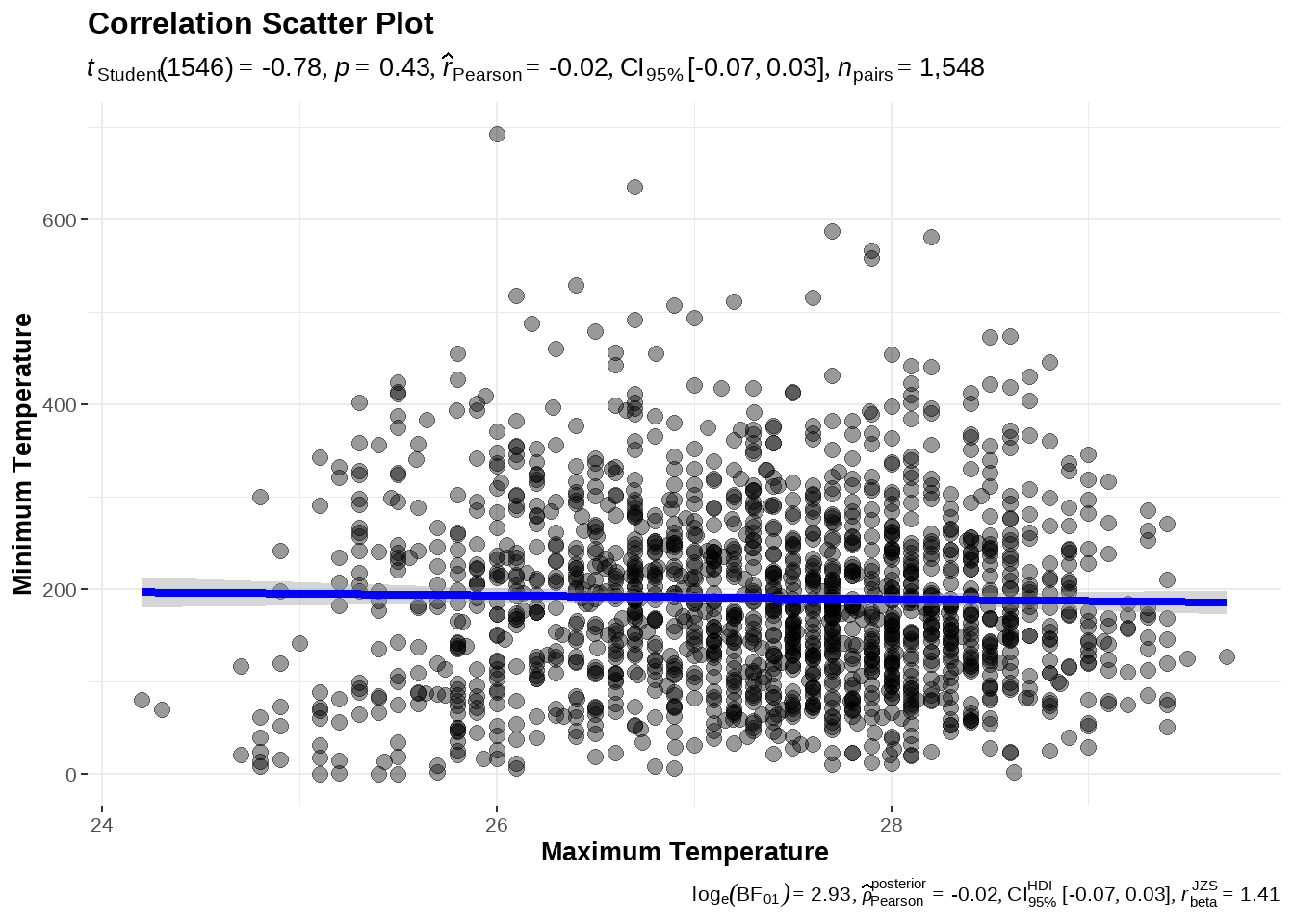
ggscatterstats(
      data = data,
      x = mean_monthly_temperature,
      y = monthly_rainfall,
      xlab = "Maximum Temperature",
      ylab = "Minimum Temperature",
      title = "Correlation Scatter Plot",
      marginal = FALSE
    )

Code
ggscatterstats(
      data = data,
      x = min_monthly_temperature,
      y = monthly_rainfall,
      xlab = "Maximum Temperature",
      ylab = "Minimum Temperature",
      title = "Correlation Scatter Plot",
      marginal = FALSE
    )

Code
ggscatterstats(
      data = data,
      x = max_monthly_temperature,
      y = monthly_rainfall,
      xlab = "Maximum Temperature",
      ylab = "Minimum Temperature",
      title = "Correlation Scatter Plot",
      marginal = FALSE
    )

4.2 Exploring relationships for temperature/ rainfall between stations

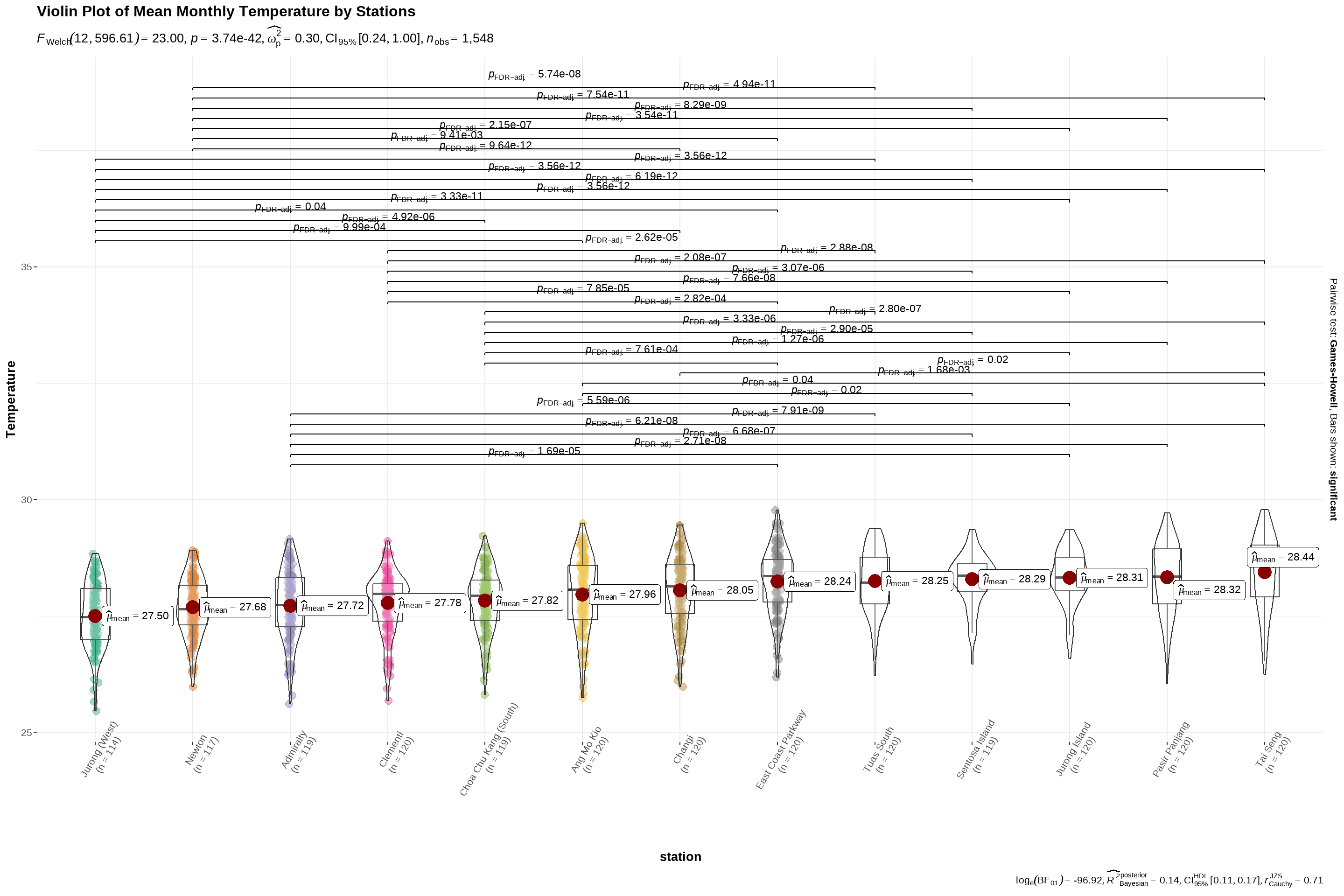
We will first arrange the stations in ascending order of mean temperature, for ease of comparison. Thereafter we will use ggbetweenstats to plot a violin plot to examine the relationship between mean temperature and station.

Code
data$station <- reorder(data$station, data$mean_monthly_temperature)
          
ggbetweenstats(
  data = data,
  x = station, 
  y = mean_monthly_temperature,
  type = "p",
  mean.ci = TRUE, 
  title = "Mean Monthly Temperature",
  pairwise.comparisons = TRUE, 
  pairwise.display = "s",
  p.adjust.method = "fdr",
  messages = FALSE) +
  labs(title = 'Violin Plot of Mean Monthly Temperature by Stations',
       y = "Temperature") +
  theme(axis.text.x = element_text(angle = 60,
                                   size = 8))

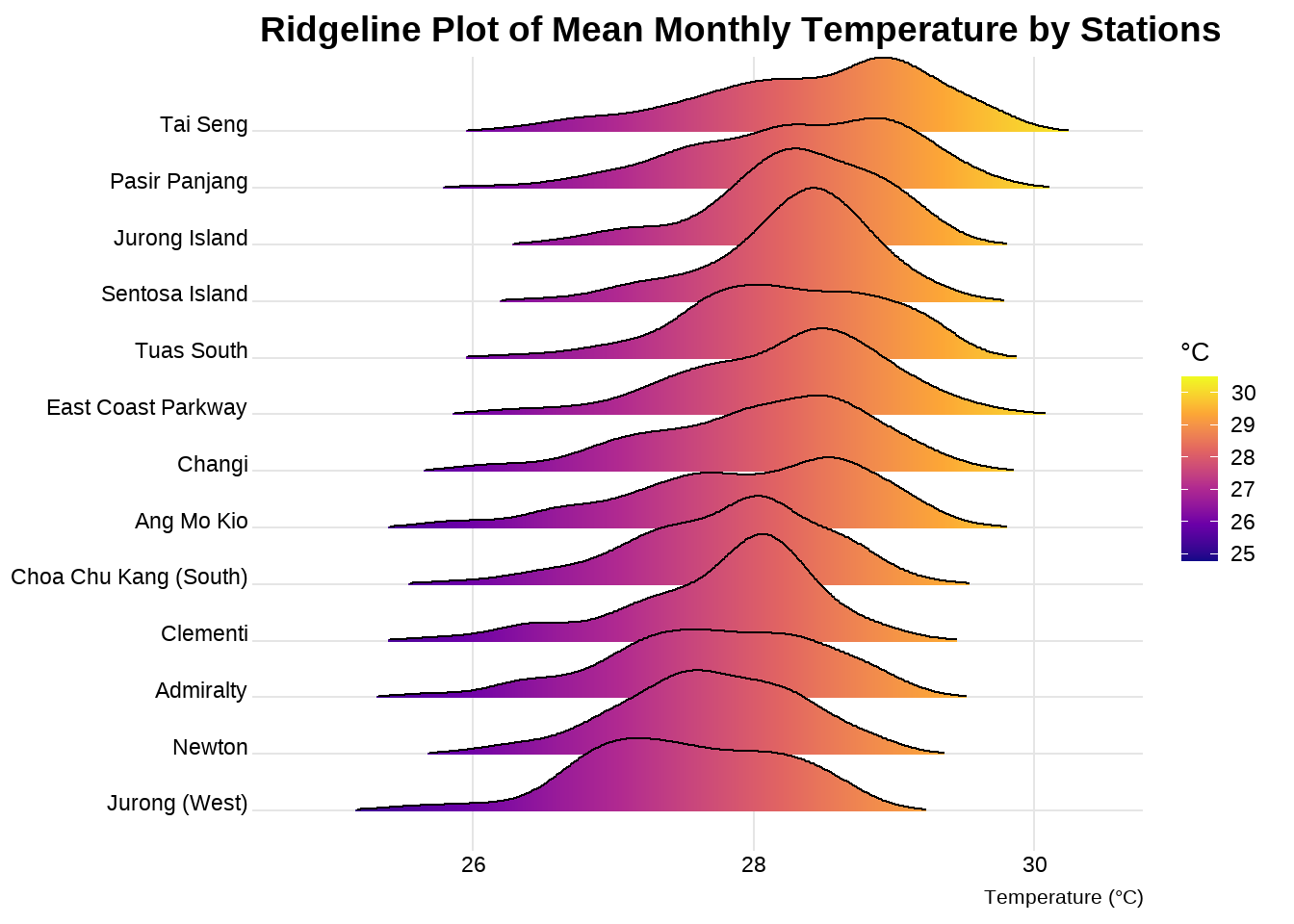
Visualisation using a ridgeline plot.

Code
ggplot(data,
       aes(x = mean_monthly_temperature, 
       y = station, 
       fill = stat(x))) +
       geom_density_ridges_gradient(scale =2,
                                    rel_min_height = 0.01,
                                    gradient_lwd = 1.) +
  scale_y_discrete(name= NULL) +
  scale_fill_viridis_c(name = "°C", option = "C") +
  labs(title = 'Ridgeline Plot of Mean Monthly Temperature by Stations',
       x = "Temperature (°C)",
       y = "Station") +
  theme_ridges(font_size = 10, grid = TRUE) +
  theme(plot.title = element_text(size = 14),
        plot.subtitle = element_text(size = 10),
        axis.title.x = element_text(size = 8),
        axis.title.y = element_text(size = 8, angle = 360))

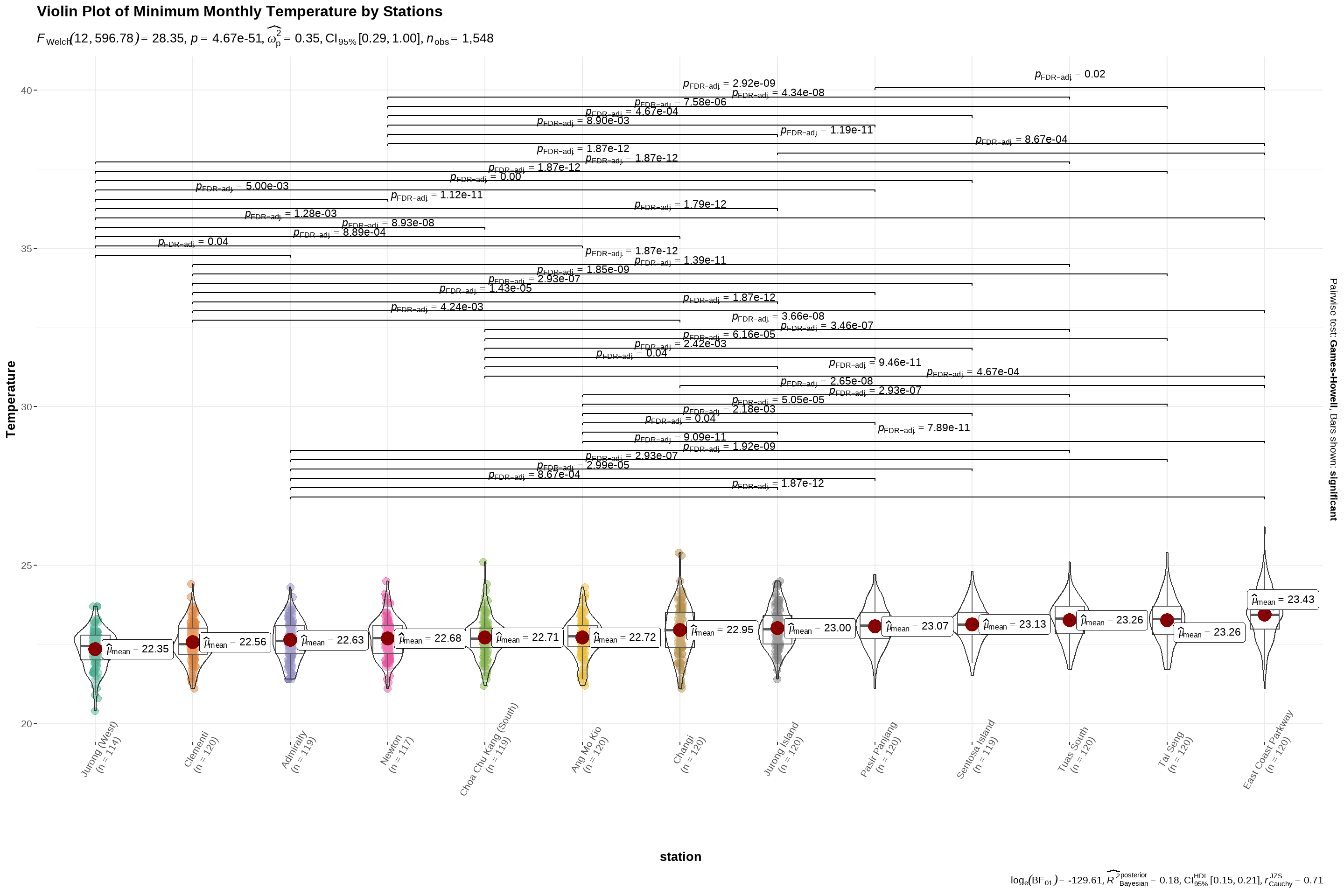
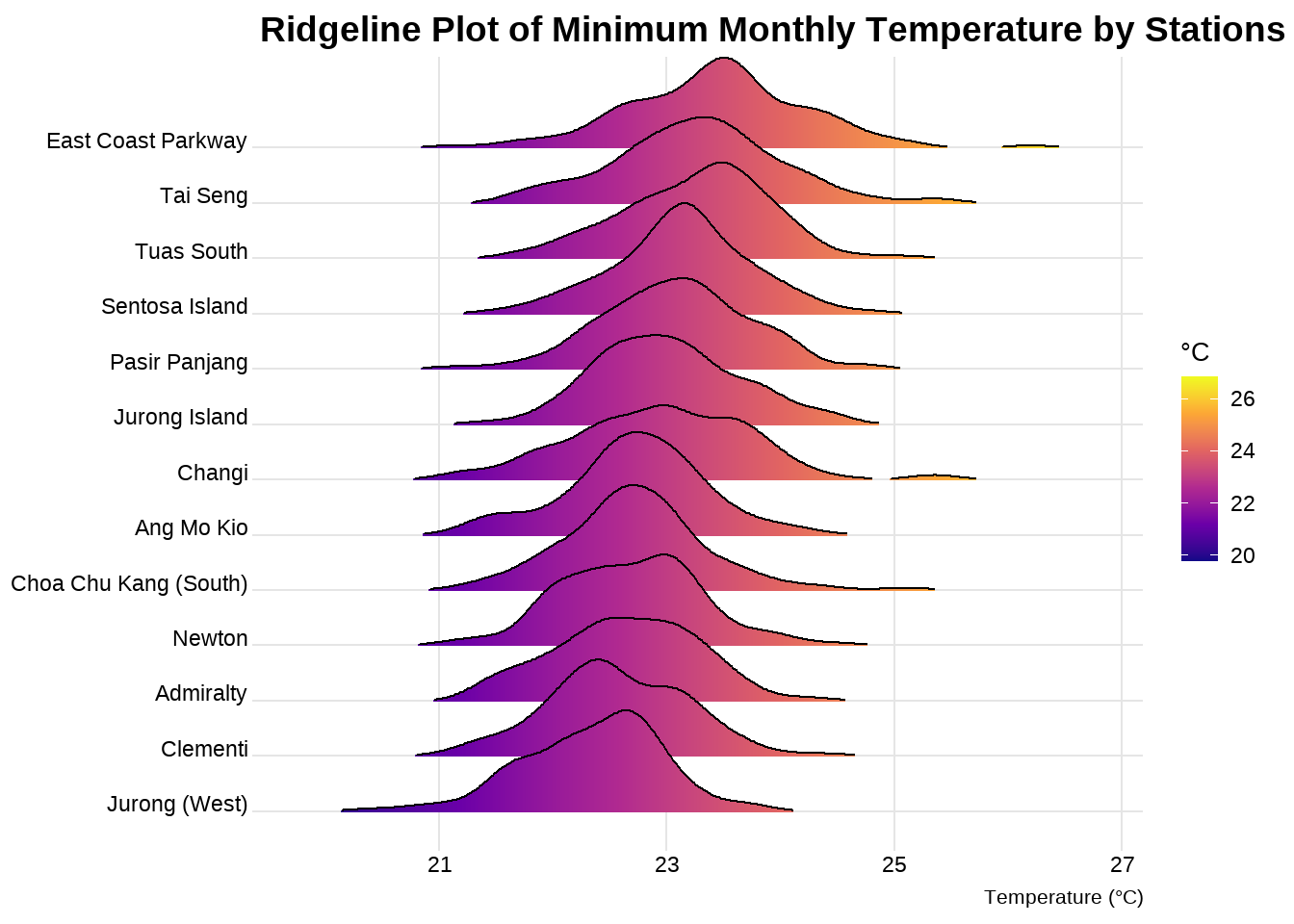
We will first arrange the stations in ascending order of minimum temperature, for ease of comparison. Thereafter we will use ggbetweenstats to plot a violin plot to examine the relationship between minimum temperature and station.

Code
data$station <- reorder(data$station, data$min_monthly_temperature)
          
ggbetweenstats(
  data = data,
  x = station, 
  y = min_monthly_temperature,
  type = "p",
  mean.ci = TRUE, 
  title = "Minimum Monthly Temperature",
  pairwise.comparisons = TRUE, 
  pairwise.display = "s",
  p.adjust.method = "fdr",
  messages = FALSE) +
  labs(title = 'Violin Plot of Minimum Monthly Temperature by Stations',
       y = "Temperature") +
  theme(axis.text.x = element_text(angle = 60,
                                   size = 8))

Visualisation using a rideline plot.

Code
ggplot(data,
       aes(x = min_monthly_temperature, 
       y = station, 
       fill = stat(x))) +
       geom_density_ridges_gradient(scale =2,
                                    rel_min_height = 0.01,
                                    gradient_lwd = 1.) +
  scale_y_discrete(name= NULL) +
  scale_fill_viridis_c(name = "°C", option = "C") +
  labs(title = 'Ridgeline Plot of Minimum Monthly Temperature by Stations',
       x = "Temperature (°C)",
       y = "Station") +
  theme_ridges(font_size = 10, grid = TRUE) +
  theme(plot.title = element_text(size = 14),
        plot.subtitle = element_text(size = 10),
        axis.title.x = element_text(size = 8),
        axis.title.y = element_text(size = 8, angle = 360))

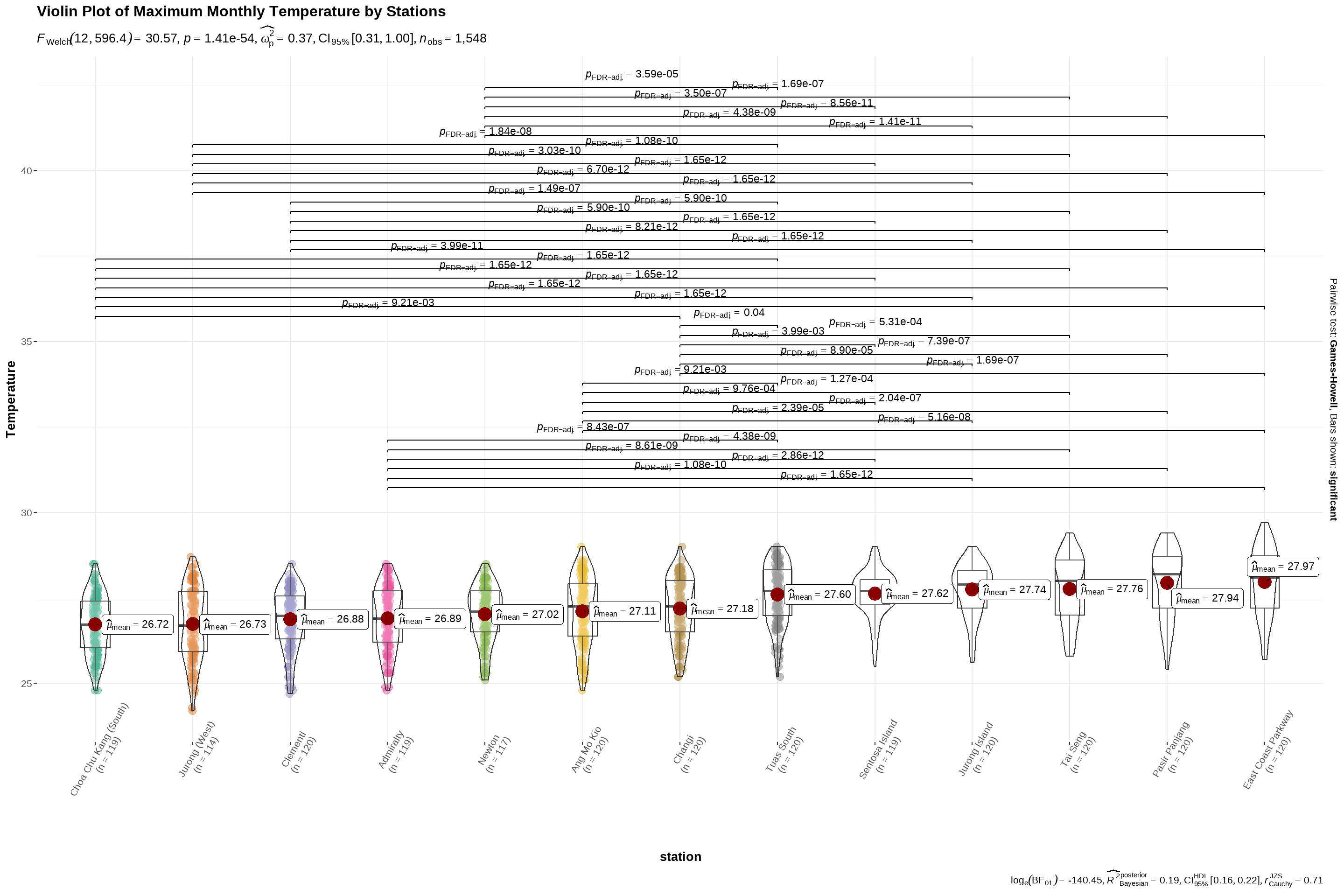
We will first arrange the stations in ascending order of maximum temperature, for ease of comparison. Thereafter we will use ggbetweenstats to plot a violin plot to examine the relationship between maximum temperature and station.

Code
data$station <- reorder(data$station, data$max_monthly_temperature)
          
ggbetweenstats(
  data = data,
  x = station, 
  y = max_monthly_temperature,
  type = "p",
  mean.ci = TRUE, 
  title = "Maximum Monthly Temperature",
  pairwise.comparisons = TRUE, 
  pairwise.display = "s",
  p.adjust.method = "fdr",
  messages = FALSE) +
  labs(title = 'Violin Plot of Maximum Monthly Temperature by Stations',
       y = "Temperature") +
  theme(axis.text.x = element_text(angle = 60,
                                   size = 8))

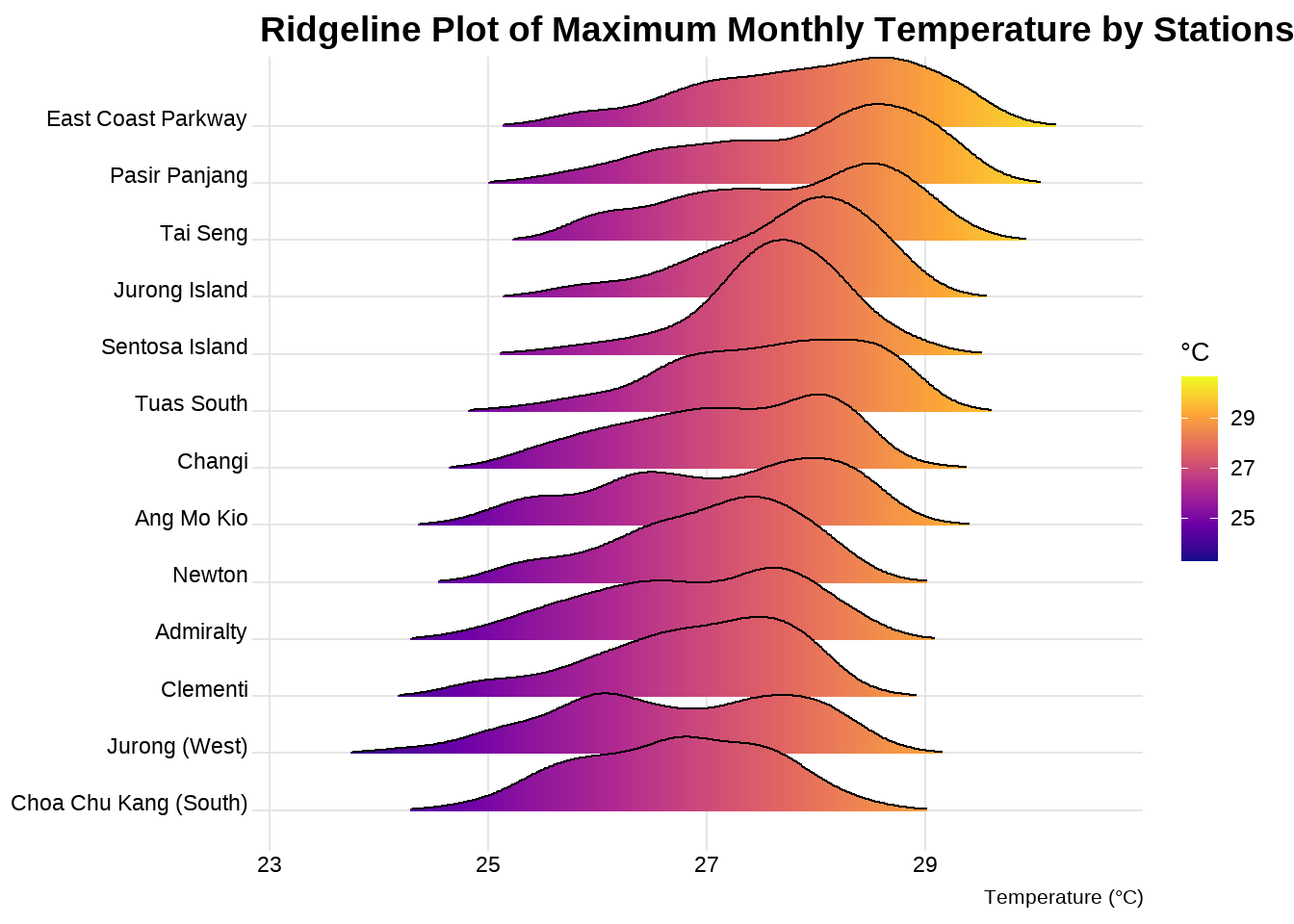
Visualising using a ridgeline plot.

Code
ggplot(data,
       aes(x = max_monthly_temperature, 
       y = station, 
       fill = stat(x))) +
       geom_density_ridges_gradient(scale =2,
                                    rel_min_height = 0.01,
                                    gradient_lwd = 1.) +
  scale_y_discrete(name= NULL) +
  scale_fill_viridis_c(name = "°C", option = "C") +
  labs(title = 'Ridgeline Plot of Maximum Monthly Temperature by Stations',
       x = "Temperature (°C)",
       y = "Station") +
  theme_ridges(font_size = 10, grid = TRUE) +
  theme(plot.title = element_text(size = 14),
        plot.subtitle = element_text(size = 10),
        axis.title.x = element_text(size = 8),
        axis.title.y = element_text(size = 8, angle = 360))

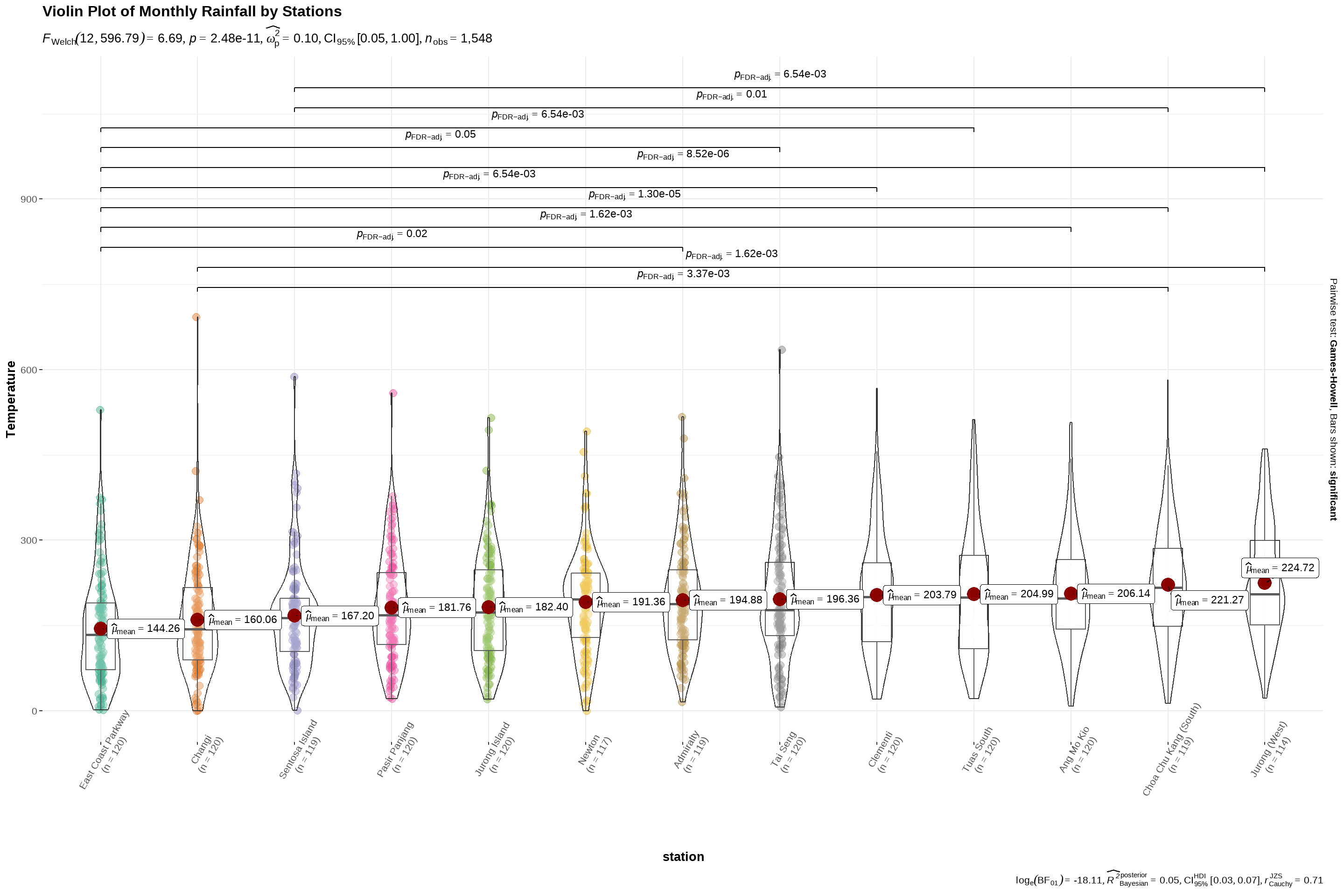
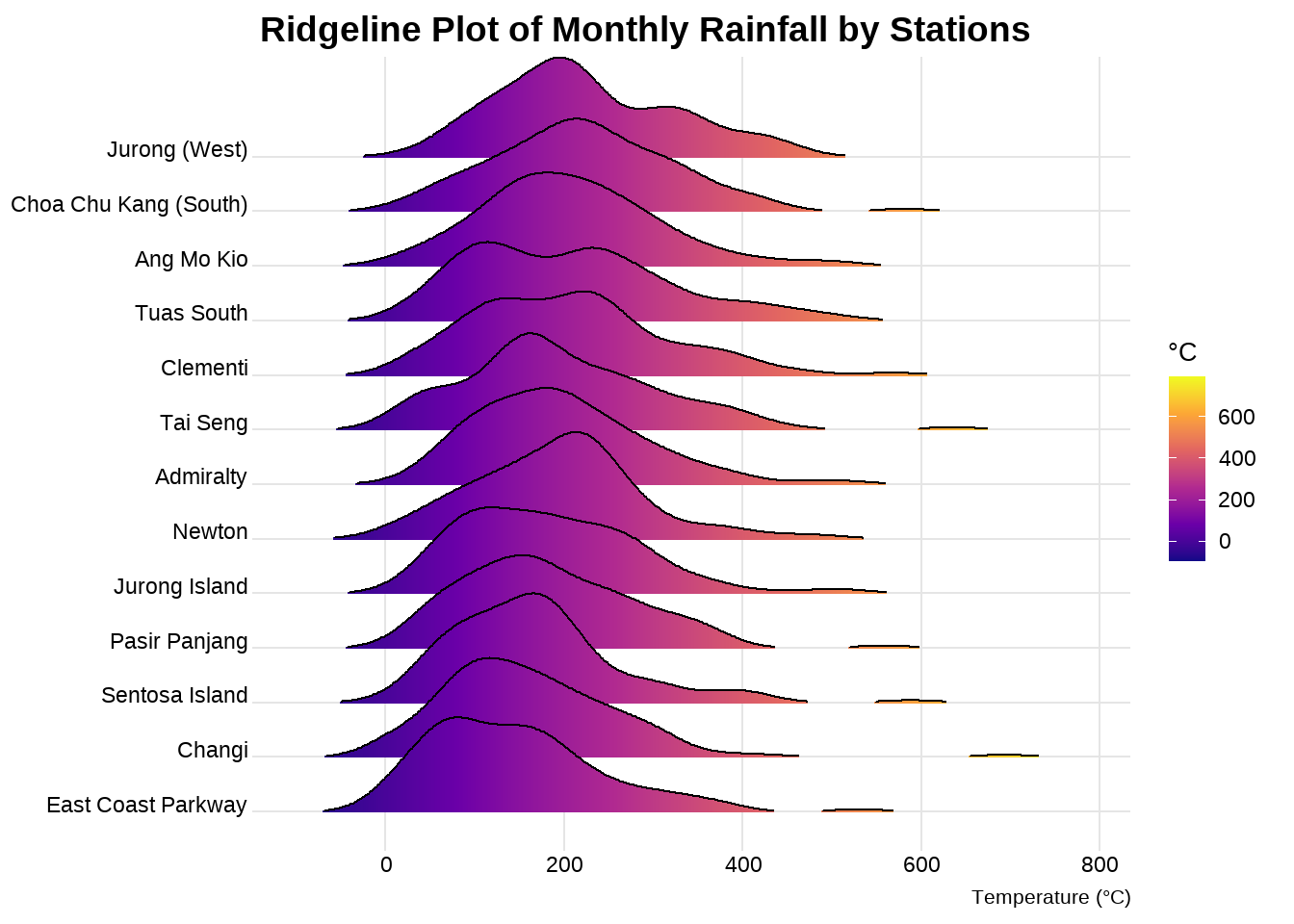
We will first arrange the stations in ascending order of monthly rainfall, for ease of comparison. Thereafter we will use ggbetweenstats to plot a violin plot to examine the relationship between monthly rainfall and station.

Code
data$station <- reorder(data$station, data$monthly_rainfall)
          
ggbetweenstats(
  data = data,
  x = station, 
  y = monthly_rainfall,
  type = "p",
  mean.ci = TRUE, 
  title = "Monthly Rainfall",
  pairwise.comparisons = TRUE, 
  pairwise.display = "s",
  p.adjust.method = "fdr",
  messages = FALSE) +
  labs(title = 'Violin Plot of Monthly Rainfall by Stations',
       y = "Temperature") +
  theme(axis.text.x = element_text(angle = 60,
                                   size = 8))

Visualising using a ridgeline plot.

Code
ggplot(data,
       aes(x = monthly_rainfall, 
       y = station, 
       fill = stat(x))) +
       geom_density_ridges_gradient(scale =2,
                                    rel_min_height = 0.01,
                                    gradient_lwd = 1.) +
  scale_y_discrete(name= NULL) +
  scale_fill_viridis_c(name = "°C", option = "C") +
  labs(title = 'Ridgeline Plot of Monthly Rainfall by Stations',
       x = "Temperature (°C)",
       y = "Station") +
  theme_ridges(font_size = 10, grid = TRUE) +
  theme(plot.title = element_text(size = 14),
        plot.subtitle = element_text(size = 10),
        axis.title.x = element_text(size = 8),
        axis.title.y = element_text(size = 8, angle = 360))

4.3 Exploring relationships for temperature/ rainfall across years

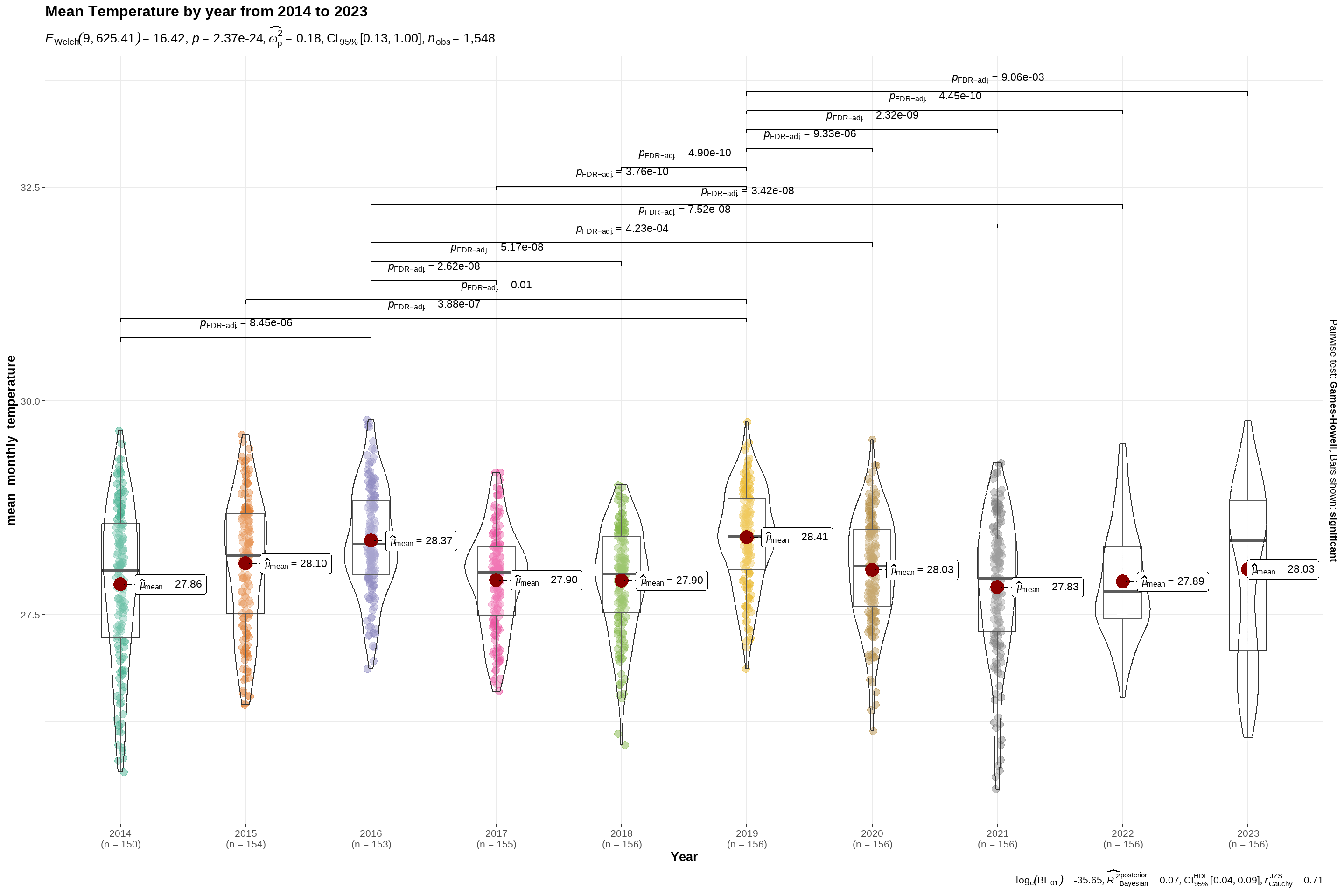
Using the code chunk below, we will use ggbetweenstats to find out if there is any significant differences between mean temperature across the years.

Code
ggbetweenstats(
  data = data,
  x = Year, 
  y = mean_monthly_temperature,
  type = "p",
  mean.ci = TRUE, 
  title = "Mean Temperature by year from 2014 to 2023",
  pairwise.comparisons = TRUE, 
  pairwise.display = "s",
  p.adjust.method = "fdr",
  messages = FALSE)

Visualising using an interactive line graph.

Code
hline.data <- data %>%
  group_by(Year) %>%
  summarise(avgvalue = mean(mean_monthly_temperature))

p6<- ggplot() +
  geom_line(data = data,
            aes(x = as.factor(Month),
                y = mean_monthly_temperature,
                label = station))+
  geom_hline(aes(yintercept=avgvalue),
       data=hline.data,
       linetype=6,
       colour="red",
       size=0.5)+
  facet_wrap(~Year,scales = "free_x")+
  labs(title = "Mean Temperature by year from 2014 to 2023",
       colour = "Month") +
  xlab("Year")+
  ylab("Degrees (°C)")+
  theme_tufte(base_family = "Helvetica")+ 
  theme(axis.text.x = element_text(angle = 90, hjust = 1, vjust = 1),
        legend.position = "none")

p6 <- ggplotly(p6, tooltip = "all")

p6

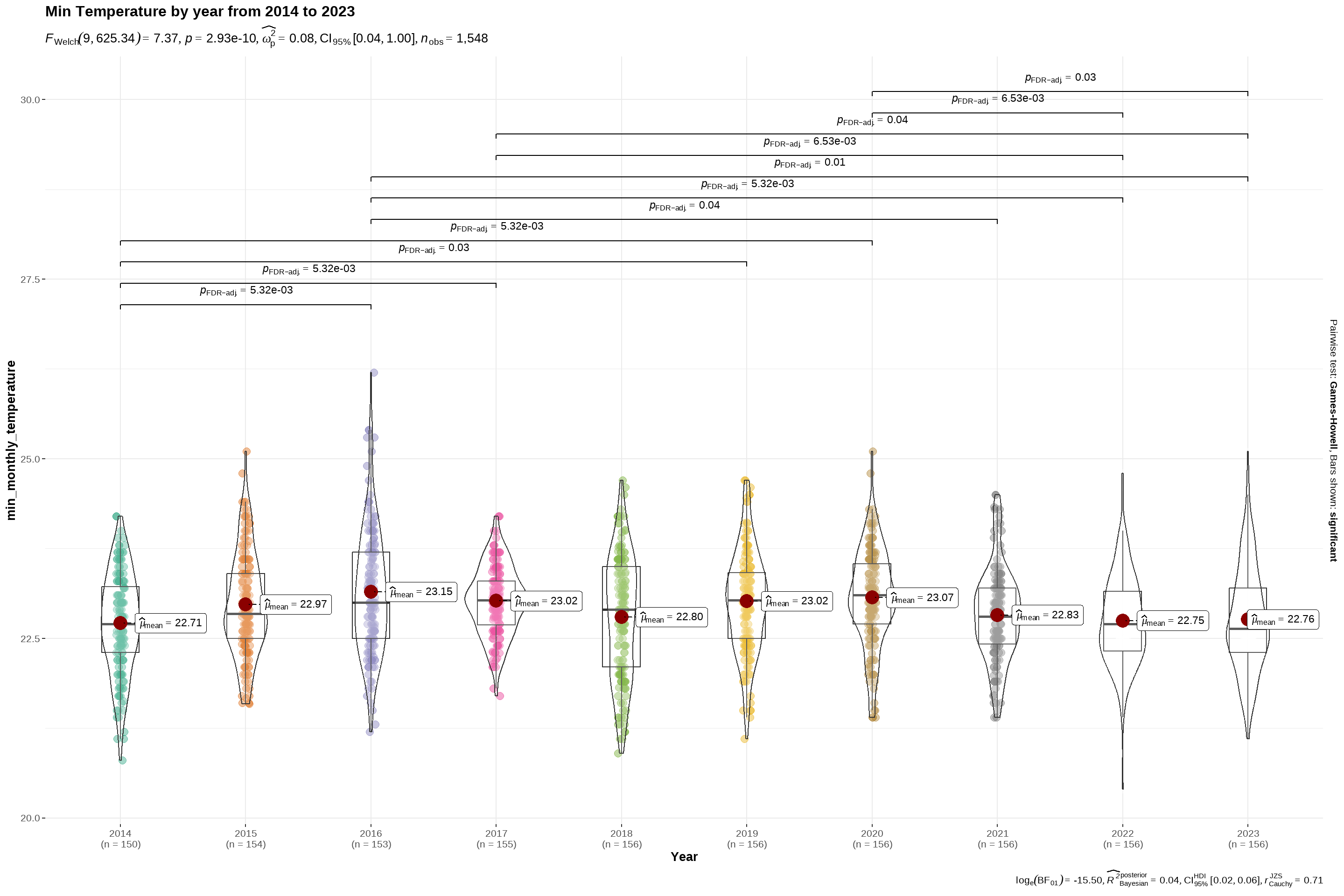
Using the code chunk below, we will use ggbetweenstats to find out if there is any significant differences between minimum temperature across the years.

Code
ggbetweenstats(
  data = data,
  x = Year, 
  y = min_monthly_temperature,
  type = "p",
  mean.ci = TRUE, 
  title = "Min Temperature by year from 2014 to 2023",
  pairwise.comparisons = TRUE, 
  pairwise.display = "s",
  p.adjust.method = "fdr",
  messages = FALSE)

Visualising using an interactive line graph.

Code
hline.data <- data %>%
  group_by(Year) %>%
  summarise(avgvalue = mean(min_monthly_temperature))

p7<- ggplot() +
  geom_line(data = data,
            aes(x = as.factor(Month),
                y = min_monthly_temperature,
                label = station))+
  geom_hline(aes(yintercept=avgvalue),
       data=hline.data,
       linetype=6,
       colour="red",
       size=0.5)+
  facet_wrap(~Year,scales = "free_x")+
  labs(title = "Min Temperature by year from 2014 to 2023",
       colour = "Month") +

  xlab("Year")+
  ylab("Degrees (°C)")+
  theme_tufte(base_family = "Helvetica")+ 
  theme(axis.text.x = element_text(angle = 90, hjust = 1, vjust = 1),
        legend.position = "none")

p7 <- ggplotly(p7, tooltip = "all")

p7

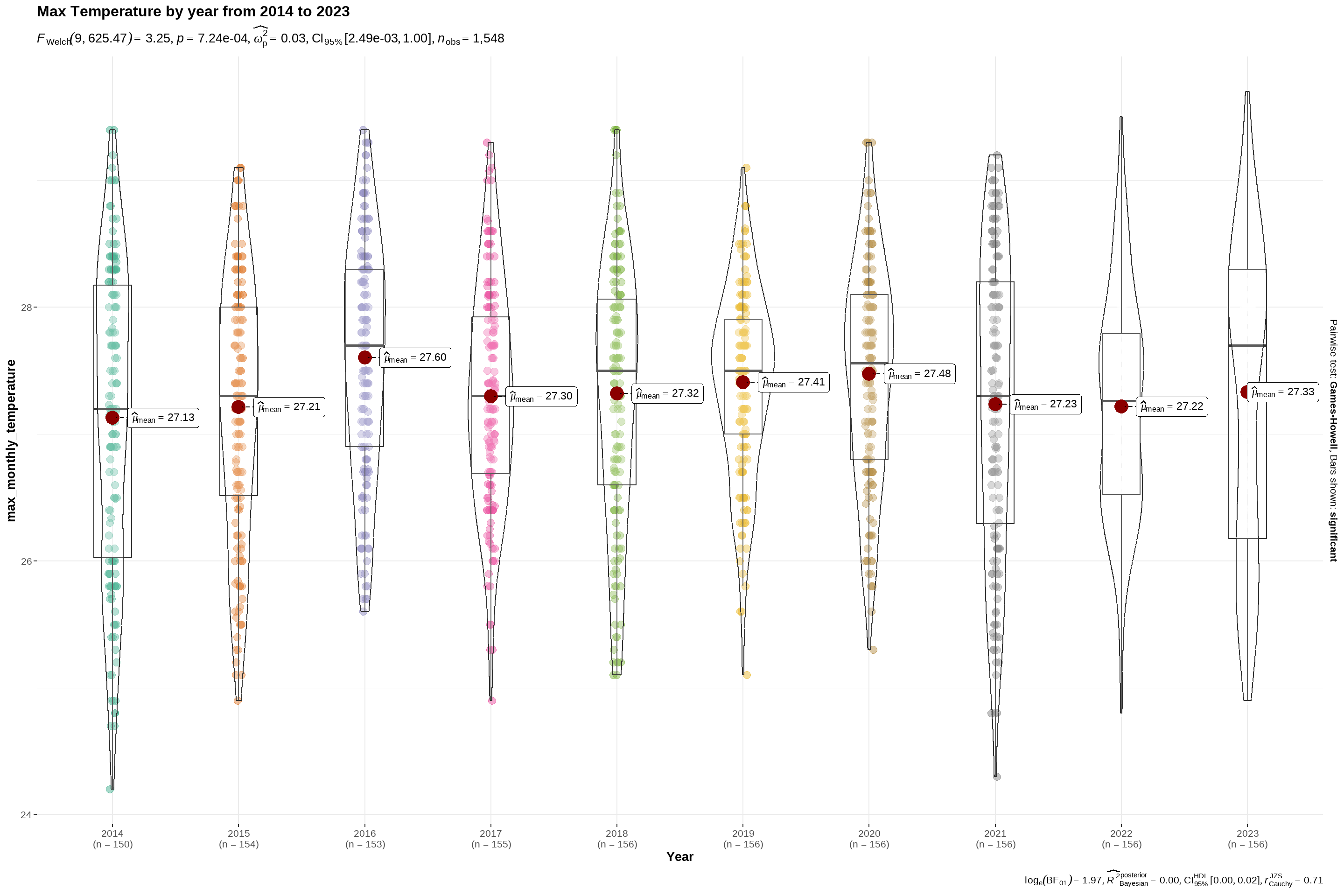
Using the code chunk below, we will use ggbetweenstats to find out if there is any significant differences between maximum temperature across the years.

Code
ggbetweenstats(
  data = data,
  x = Year, 
  y = max_monthly_temperature,
  type = "p",
  mean.ci = TRUE, 
  title = "Max Temperature by year from 2014 to 2023",
  pairwise.comparisons = TRUE, 
  pairwise.display = "s",
  p.adjust.method = "fdr",
  messages = FALSE)

Visualising using an interactive line graph.

Code
hline.data <- data %>%
  group_by(Year) %>%
  summarise(avgvalue = mean(max_monthly_temperature))

p8<- ggplot() +
  geom_line(data = data,
            aes(x = as.factor(Month),
                y = max_monthly_temperature,
                label = station))+
  geom_hline(aes(yintercept=avgvalue),
       data=hline.data,
       linetype=6,
       colour="red",
       size=0.5)+
  facet_wrap(~Year,scales = "free_x")+
  labs(title = "Max Temperature by year from 2014 to 2023",
       colour = "Month") +

  xlab("Year")+
  ylab("Degrees (°C)")+
  theme_tufte(base_family = "Helvetica")+ 
  theme(axis.text.x = element_text(angle = 90, hjust = 1, vjust = 1),
        legend.position = "none")

p8 <- ggplotly(p8, tooltip = "all")

p8

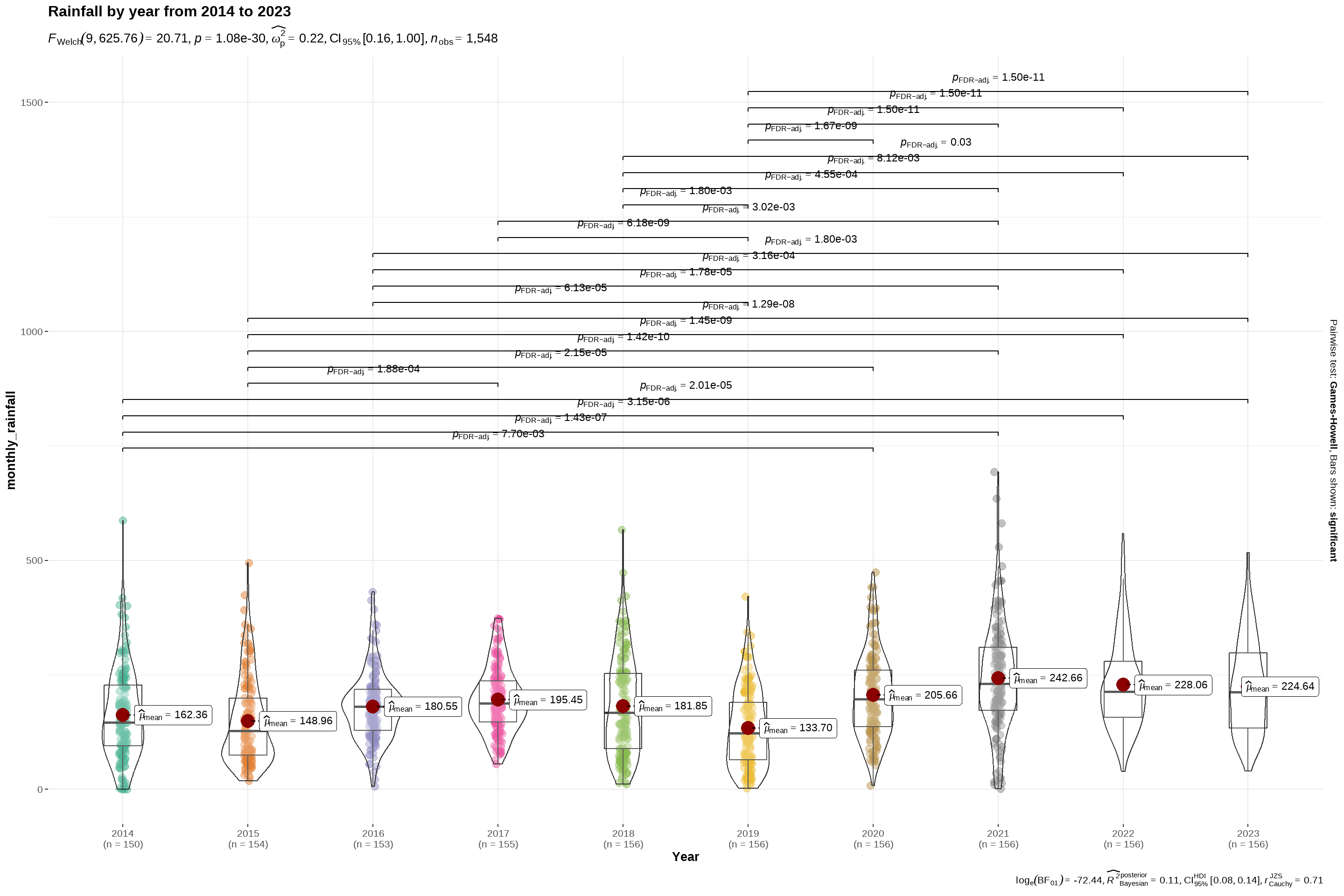
Using the code chunk below, we will use ggbetweenstats to find out if there is any significant differences between monthly rainfall across the years.

Code
ggbetweenstats(
  data = data,
  x = Year, 
  y = monthly_rainfall,
  type = "p",
  mean.ci = TRUE, 
  title = "Rainfall by year from 2014 to 2023",
  pairwise.comparisons = TRUE, 
  pairwise.display = "s",
  p.adjust.method = "fdr",
  messages = FALSE)

Visualising using an interactive line graph.

Code
p9 <- ggplot(data,
             aes(y=monthly_rainfall,
                 x = as.factor(Month),
                 fill = as.factor(Year),
                 label = station)) +
  geom_bar(stat = "identity")+
  facet_wrap(~Year, scales = "free_x") +
  labs(title="Monthly rainfall each year from 2014 to 2023",
       y = "Rainfall volume (mm)",
       x = "Month") +
  theme_minimal()+
  theme(panel.spacing.y = unit(10, "lines"))+
  scale_fill_discrete(name = "Year")

p9 <- ggplotly(p9, tooltip = "all")

p9

4.4 Exploring relationships for temperature/ rainfall across months

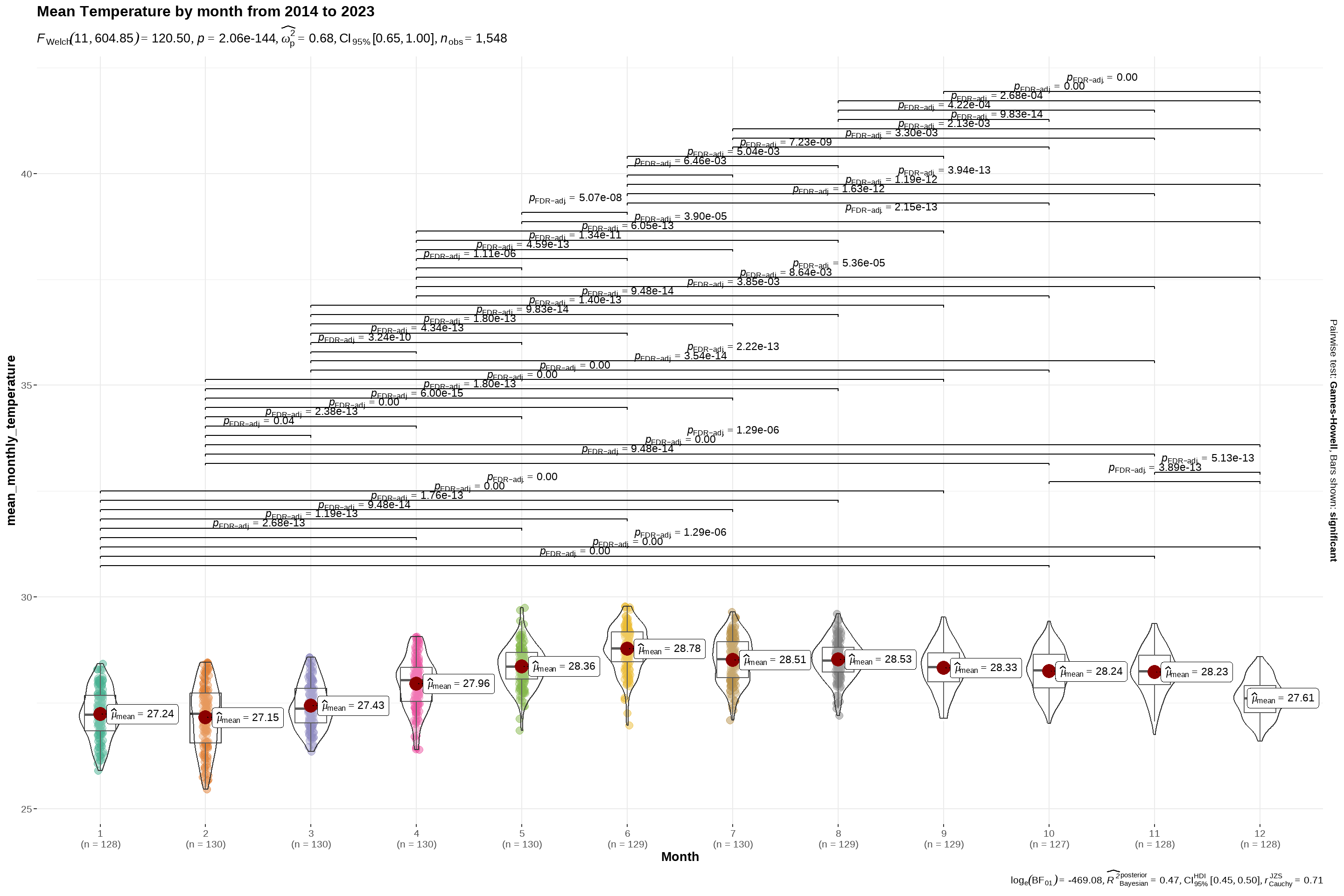
Using the code chunk below, we will use ggbetweenstats to find out if there is any significant differences between mean temperature across the different months in a year.

Code
ggbetweenstats(
  data = data,
  x = Month, 
  y = mean_monthly_temperature,
  type = "p",
  mean.ci = TRUE, 
  title = "Mean Temperature by month from 2014 to 2023",
  pairwise.comparisons = TRUE, 
  pairwise.display = "s",
  p.adjust.method = "fdr",
  messages = FALSE)

Visualising using an interactive line graph.

Code
hline.data <- data %>%
  group_by(Month) %>%
  summarise(avgvalue = mean(mean_monthly_temperature))

p1<- ggplot() +
  geom_line(data = data,
            aes(x = Year,
                y = mean_monthly_temperature,
                group = Month,
                colour = as.factor(Month),
                 label = station))+
  geom_hline(aes(yintercept=avgvalue),
       data=hline.data,
       linetype=6,
       colour="red",
       size=0.5)+
  facet_wrap(~Month,scales = "free_x")+
  labs(title = "Mean Temperature by month from 2014 to 2023",
       colour = "Month") +

  xlab("Year")+
  ylab("Degrees (°C)")+
  theme_tufte(base_family = "Helvetica")+ 
  theme(axis.text.x = element_text(angle = 90, hjust = 1, vjust = 1),
        legend.position = "none")

p1 <- ggplotly(p1, tooltip = "all")

p1

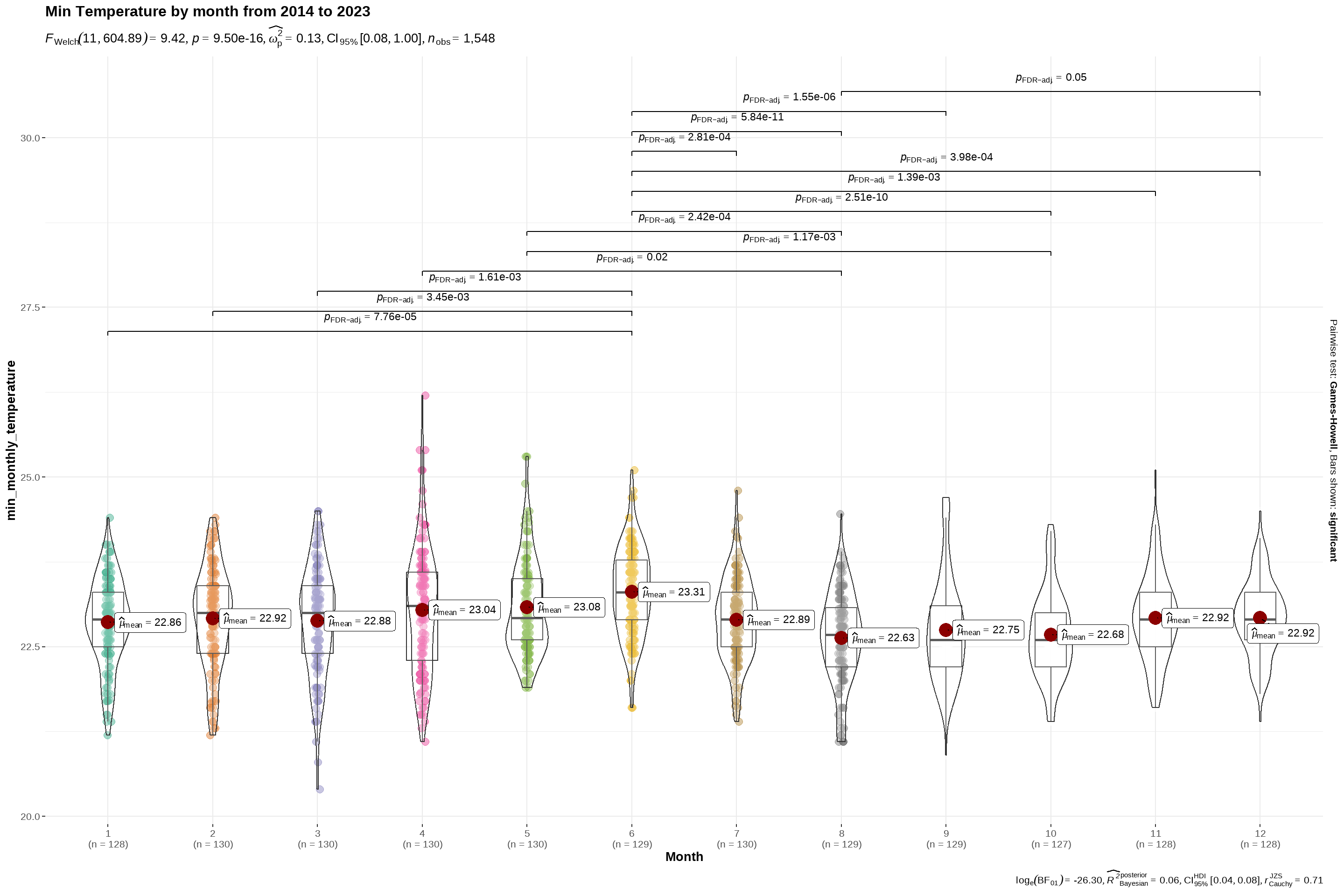
Using the code chunk below, we will use ggbetweenstats to find out if there is any significant differences between minimum temperature across the different months in a year.

Code
ggbetweenstats(
  data = data,
  x = Month, 
  y = min_monthly_temperature,
  type = "p",
  mean.ci = TRUE, 
  title = "Min Temperature by month from 2014 to 2023",
  pairwise.comparisons = TRUE, 
  pairwise.display = "s",
  p.adjust.method = "fdr",
  messages = FALSE)

Visualising using an interactive line graph.

Code
hline.data2 <- data %>%
  group_by(Month) %>%
  summarise(avgvalue = mean(min_monthly_temperature))

p2<- ggplot() +
  geom_line(data = data,
            aes(x = Year,
                y = min_monthly_temperature,
                group = Month,
                colour = as.factor(Month),
                 label = station))+
  geom_hline(aes(yintercept=avgvalue),
       data=hline.data2,
       linetype=6,
       colour="red",
       size=0.5)+
  facet_wrap(~Month,scales = "free_x")+
  labs(title = "Min Temperature by month from 2014 to 2023",
       colour = "Month") +

  xlab("Year")+
  ylab("Degrees (°C)")+
  theme_tufte(base_family = "Helvetica")+ 
  theme(axis.text.x = element_text(angle = 90, hjust = 1, vjust = 1),
        legend.position = "none")

p2 <- ggplotly(p2, tooltip = "all")

p2

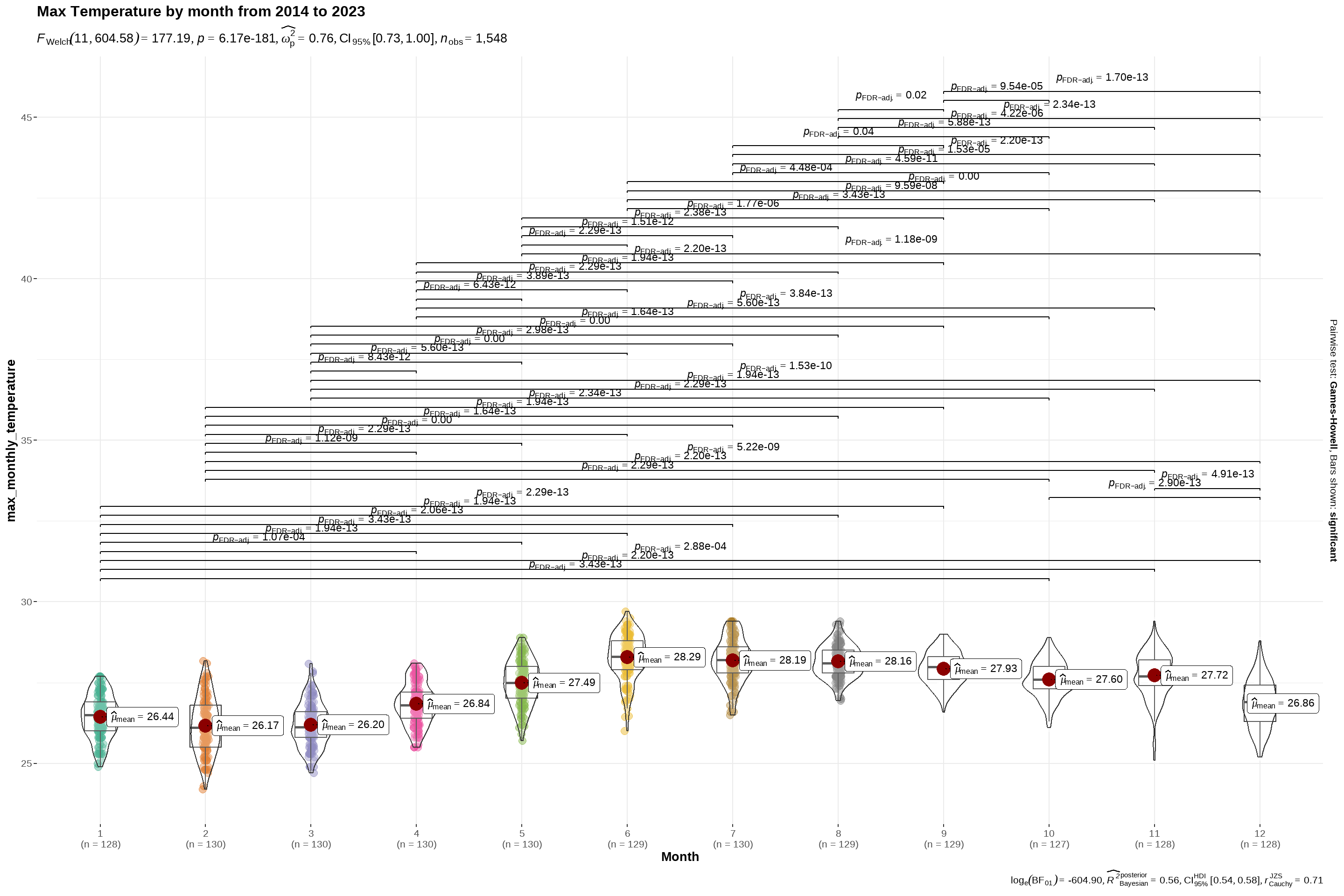
Using the code chunk below, we will use ggbetweenstats to find out if there is any significant differences between maximum temperature across the different months in a year.

Code
ggbetweenstats(
  data = data,
  x = Month, 
  y = max_monthly_temperature,
  type = "p",
  mean.ci = TRUE, 
  title = "Max Temperature by month from 2014 to 2023",
  pairwise.comparisons = TRUE, 
  pairwise.display = "s",
  p.adjust.method = "fdr",
  messages = FALSE)

Visualising using an interactive line graph.

Code
hline.data3 <- data %>%
  group_by(Month) %>%
  summarise(avgvalue = mean(max_monthly_temperature))

p3<- ggplot() +
  geom_line(data = data,
            aes(x = Year,
                y = max_monthly_temperature,
                group = Month,
                colour = as.factor(Month),
                 label = station))+
  geom_hline(aes(yintercept=avgvalue),
       data=hline.data3,
       linetype=6,
       colour="red",
       size=0.5)+
  facet_wrap(~Month,scales = "free_x")+
  labs(title = "Max Temperature by month from 2014 to 2023",
       colour = "Month") +

  xlab("Year")+
  ylab("Degrees (°C)")+
  theme_tufte(base_family = "Helvetica")+ 
  theme(axis.text.x = element_text(angle = 90, hjust = 1, vjust = 1),
        legend.position = "none")

p3 <- ggplotly(p3, tooltip = "all")

p3

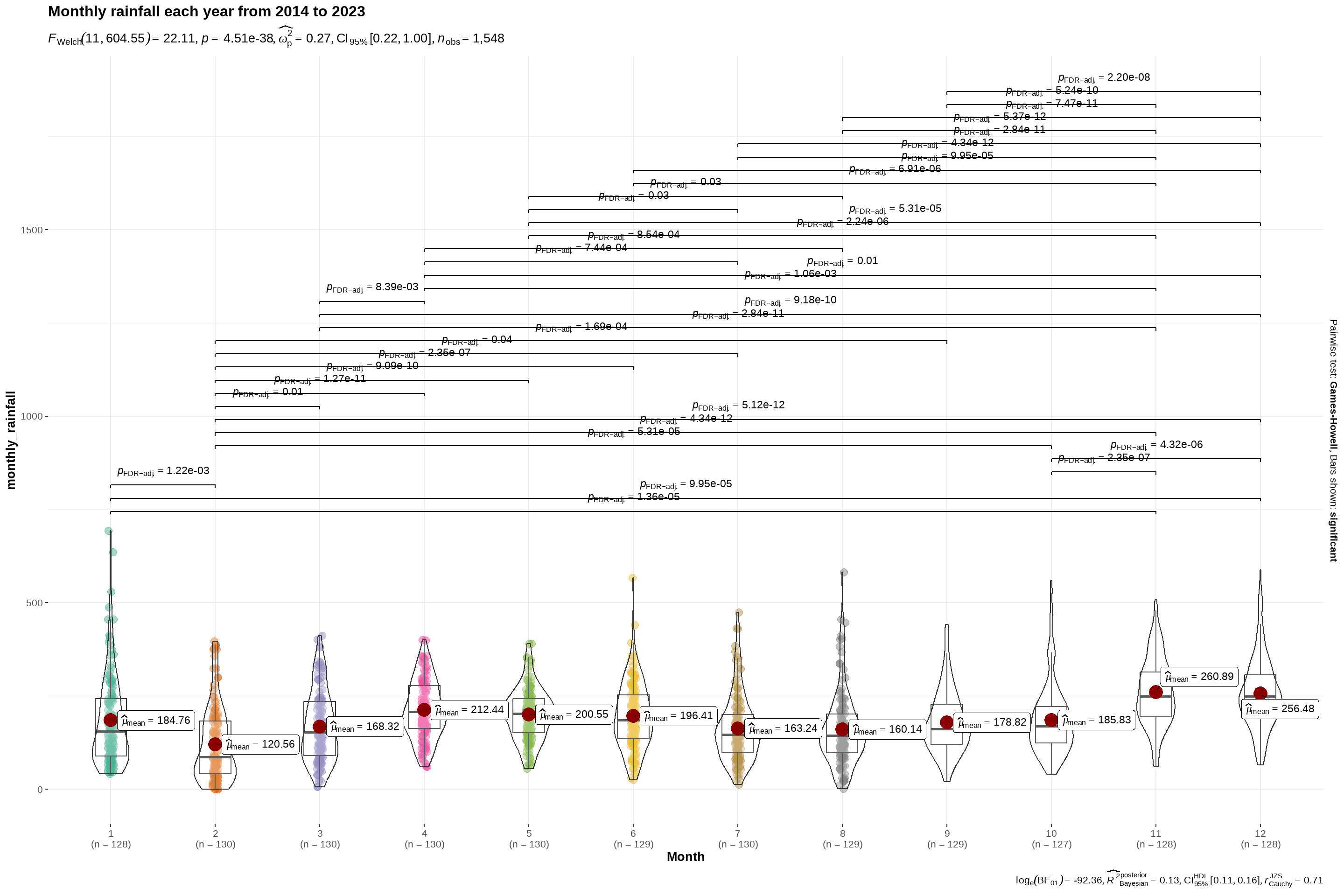
Using the code chunk below, we will use ggbetweenstats to find out if there is any significant differences between monthly rainfall across the different months in a year.

Code
ggbetweenstats(
  data = data,
  x = Month, 
  y = monthly_rainfall,
  type = "p",
  mean.ci = TRUE, 
  title = "Monthly rainfall each year from 2014 to 2023",
  pairwise.comparisons = TRUE, 
  pairwise.display = "s",
  p.adjust.method = "fdr",
  messages = FALSE)

Visualising using an interactive bar chart.

Code
p5 <- ggplot(data,
             aes(y=monthly_rainfall,
                 x = as.factor(Year),
                 fill = as.factor(Year),
                 label = station)) +
  geom_bar(stat = "identity")+
  facet_wrap(~Month, scales = "free_x") +
  labs(title="Monthly rainfall each year from 2014 to 2023",
       y = "Rainfall volume (mm)",
       x = "Month") +
  theme_minimal()+
  theme(panel.spacing.y = unit(10, "lines"))+
  scale_fill_discrete(name = "Year")  + 
  theme(axis.text.x = element_text(angle = 90, hjust = 1, vjust = 1),
        legend.position = "none")

p5 <- ggplotly(p5, tooltip = "all")

p5